
Why this matters (in two lines)
AI isn’t one thing anymore—it’s a growing toolkit that helps people write, code, design, learn, sell, and even grow crops better. Below is a friendly, no-nonsense tour of what’s new and why you should care.
New Products & Platforms You’ll Hear About
- Amazon’s workplace agents — Think of these as tireless digital coworkers that research, summarize, and trigger workflows. Early users report faster decision-making and less “tab chaos.”
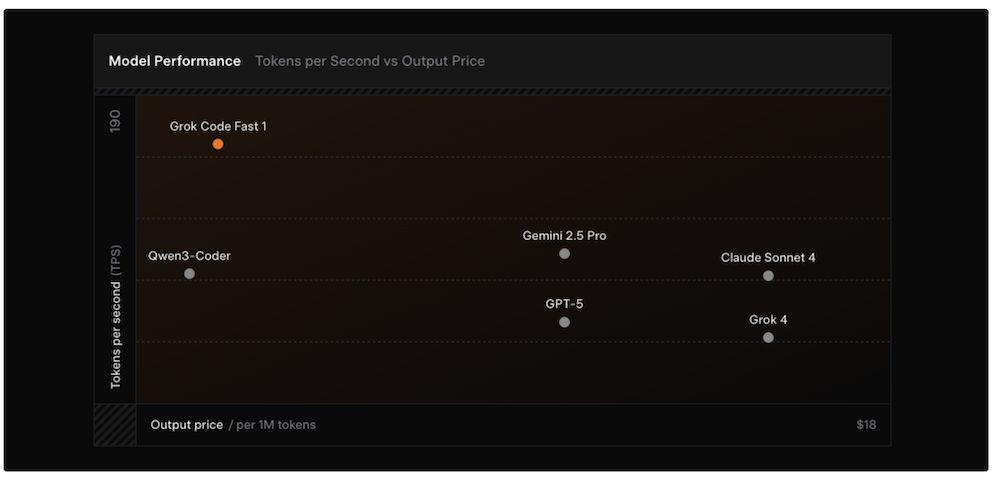
- xAI’s “Grok-Code-Fast-1” — A coding-focused model built to reason about tasks, plan steps, and write production-grade code with fewer hand-holding prompts.
- Preply’s AI + human tutor combo — AI builds personalized learning paths and handles rote practice, while real tutors jump in for nuance and motivation. Best of both worlds.
- iZotope Ozone 12 — For creators: AI-assisted mastering that helps clean up mixes, control bass, and push loudness without wrecking your sound.
Plain speak: we’re moving from “chatting with a bot” to “getting actual work done,” especially in coding, content, and learning.
Under the Hood: Big Infrastructure Moves
OpenAI is working on custom chips with major manufacturing partners. Why that matters: purpose-built hardware can make models cheaper, faster, and more energy-efficient—good for wallets and for scale.
Plain speak: everyone wants Nvidia-class horsepower without the price tag and supply squeeze.
Agents in the Wild (Beyond the Hype)
- Autonomous planners — Agents that set goals, break them down, and execute steps with minimal supervision. Handy for repetitive back-office work or long research tasks.
- Vertical agents — Purpose-built helpers for sales ops, support, QA, or finance close. They don’t try to do everything—just one job extremely well.
- Human-in-the-loop designs — The winning pattern: let AI draft, plan, or test; let humans review and decide. Faster outcomes, fewer gotchas.
Generative Media: Your New Creative Stack
- Voice & audio — Tools like ElevenLabs keep adding richer voices, multilingual options, and music generation. Use cases: podcasts, product videos, training.
- Video & avatars — Real-time lip-sync, dubbing, and presenter avatars make it ridiculously easy to localize content without re-shooting.
- Design & imaging — Better text-to-image, smarter inpainting, and layout suggestions speed up concepting and iteration.
Plain speak: a solo creator can now ship what used to take a team and a week—often in an afternoon.
Trend Radar: What’s Quietly Winning
- Multimodal by default — Tools read text, see images, hear audio, and respond in whatever format helps most.
- Security & compliance baked in — Enterprise buyers ask about data boundaries first. The best tools have clear answers and admin controls.
- Workflow-native AI — Integrations with docs, CRM, IDEs, and ticketing tools beat standalone chatbots every time.
- Agent safety rails — Sandboxes, approvals, and audit trails are becoming standard to keep autonomous systems on-track.
Quick Cheatsheet by Category
CategoryFresh Tools & IdeasWhere They ShineWorkplace AgentsAmazon-style assistants; vertical sales/support agentsSummaries, research, routing, triggering workflowsCodingGrok-Code-Fast-1; multi-step planning & refactoringLegacy cleanup, test writing, CI fixes, scaffoldingLearningAI + human tutor hybridsPersonalized practice, progress tracking, motivationAudio/VideoOzone 12 mastering; voice cloning; AI dubbingFaster post-production and multilingual contentInfraCustom AI chips; model-distillationLower cost, faster inference, better privacy
How to Pick the Right Tool (no jargon)
- Start with the job, not the model. Write one sentence: “We need to reduce X by Y% in Z weeks.”
- Map your workflow. Where are the handoffs? Those are perfect places for AI to draft or validate.
- Demand guardrails. Look for approval steps, change logs, and easy rollbacks.
- Pilot fast, measure faster. Pick 1–2 use cases, run a two-week trial, track time saved and error rates.
- Think total cost. Include seats, usage, integration time, and the “cost” of low accuracy.
Real Talk: What AI Still Can’t Do (Well)
- Perfect judgment — Models can draft a contract; they can’t be your lawyer.
- Flawless facts — Great at speed, but you still need verification for anything that matters.
- Context you never gave — The more examples and rules you provide, the better it performs.
Rule of thumb: Let AI do the heavy lifting. Keep humans in charge of taste, truth, and decisions.
Getting Started This Week
- Pick one workflow (e.g., weekly report, QA checks, or meeting notes) and automate just that.
- Create a “golden example” of what good looks like; use it to judge outputs.
- Set an approval step so nothing goes live without a quick human glance.
Note: The landscape moves fast. Names and features change; the patterns above—agents for work, multimodal tools for creation, and strong safety rails—are what endure.